
Hidden Areas on a Drive in the Wild?
From a handful of digital forensics classes and books, I learned data may be hidden on drives by a user using freely available tools to configure specific drive features. National Institute of Standards and Technology (NIST) states the presence of hidden areas on drives is a potential technical issue when collecting data (NIST, 2006). Anecdotal observations suggest hidden areas on drives are rare in the wild. Nevertheless, the potential for hidden areas to conceal critical data necessitates a thorough process to identify and reveal those areas when possible. Without preparation or awareness of their existence, it increases the risk of failing to acquire all user-accessible space that may contain data relevant to an investigation (Gupta, Hoeschele & Rogers, 2006).
The prominent features discussed, it seems, are Host Protected Area (HPA) and Device Configuration Overlay (DCO). As often the topic of hidden areas on drives are discussed in literature and classes, I first learned about Accessible Max Address Configuration (AMAC) early this year.
With the exception of a handful of vendors documenting their ability to detect and reset AMAC and INCITS, information about AMAC appears sparse despite HPA and DCO obsolesce since ATA/ATAPI Command Set (ACS-3). Admittedly, I only became aware of AMAC when a Tableau UltraDock 4D (T356789iu) and a Tableau TX1 alerted, “AMA limiting drive size”, on a SATA SSD by 512 bytes (An example of the alert can be seen on page 67 of OpenText’s software v20.2 release presentation saved at DataExpert.nl).
Before attempting to reset AMAC, I:
- documented the presence of AMAC, current Logical Block Addressing (LBA) count and potential max LBA count.
- imaged the drive.
- verified the LBA count of the image versus the current LBA count of the evidence drive.
To my surprise, resetting AMAC failed. Other drives of the same make and model also failed.
Provided these were corporate storage devices and the behavior was observed on multiple drives of the same make and model used by different individuals with no apparent connection, I believed the likelihood that any relevant, user-generated data was low.
To check my sanity and understanding of AMAC, I refreshed my knowledge on HPA and DCO, sought additional information about AMAC, performed hands-on testing to reinforce my understanding of AMAC, and validated tools to detect and reset AMAC.
HPA and DCO Review
Enabling features like HPA was intended to be used by vendors to store data; however, users with accessible tools may choose use HPA to hide data (Carrier, 2005). In a U.S. Department of Justice National Institute of Justice Special Report, it states, “presence of user-created data in an HPA may indicate an attempt to conceal data.” Legitimate uses do exist. In data recovery, Scott Moulton uses the HPA to resize disks when cloning, or limit data recovery functions to a smaller segment of a drive.
In addition to drive features that may be implemented, the DCO has the ability to change the apparent size of a drive, which may also be used to hide data (Carrier, 2005). In Practical Forensic Imaging, Bruce Nikkel explains the DCO was developed to allow computer manufacturers to uniformly apply features to a variety of drives (Nikkel, 2016).
| ATA Feature Set | Description |
|---|---|
| Host Protected Area (HPA) | Introduced in the ATA-4 standard. A reserved area to store diagnostic utilities. |
| Device Configuration Overlay (DCO) | Introduced in the ATA-6 standard. Permits flexibility for drive manufacturers, which can be configured downstream to enable or disable features, including apparent capacity. |
AMAC Review
Since ACS-3, HPA and DCO were obsoleted and the AMAC feature set was introduced (Hatfield & Hubbard, 2012). Like HPA and DCO, AMAC may be set to limit the apparent size of a drive.
The Accessible Max Address Configuration feature set provides a method for a host to discover the native max address and control the accessible max address.
The following commands are mandatory for devices that support the Accessible Max Address Configuration feature set:
Working Draft ATA/ATAPI Command Set – 3 (ACS-3), page 22. 2013-10-28 (T13, 2013).
ACS-3 Command Set Description GET NATIVE MAX ADDRESS EXT Returns the maximum LBA that is available to be accessible for the physical device. SET ACCESSIBLE MAX ADDRESS EXT Sets the accessible max address to the value contained in the LBA field FREEZE ACCESSIBLE MAX ADDRESS EXT If successful, the device will aborted subsequent SET ACCESSIBLE MAX ADDRESS
EXT commands until a power-on reset.
The Tableau Forensic Imager TX1 has supported the AMAC feature set for drives using the ACS-3 specification since firmware update v7.28. The AMAC feature set for the Tableau T356789iu has been supported since v7.26. In May 2020, DataExpert sponsored a presentation about the Tableau v20.2 release that provides more information about their support of the AMAC feature set (Page & Gregory, 2020).
Products from Atola reportedly detects and resets AMAC. Since v3.17a, the DeepSpar USB Stabilizer and Guardonix can also detect and reset AMAC. The WeibeTech UltraDock v6 is capable of the same.
Obtaining Drives
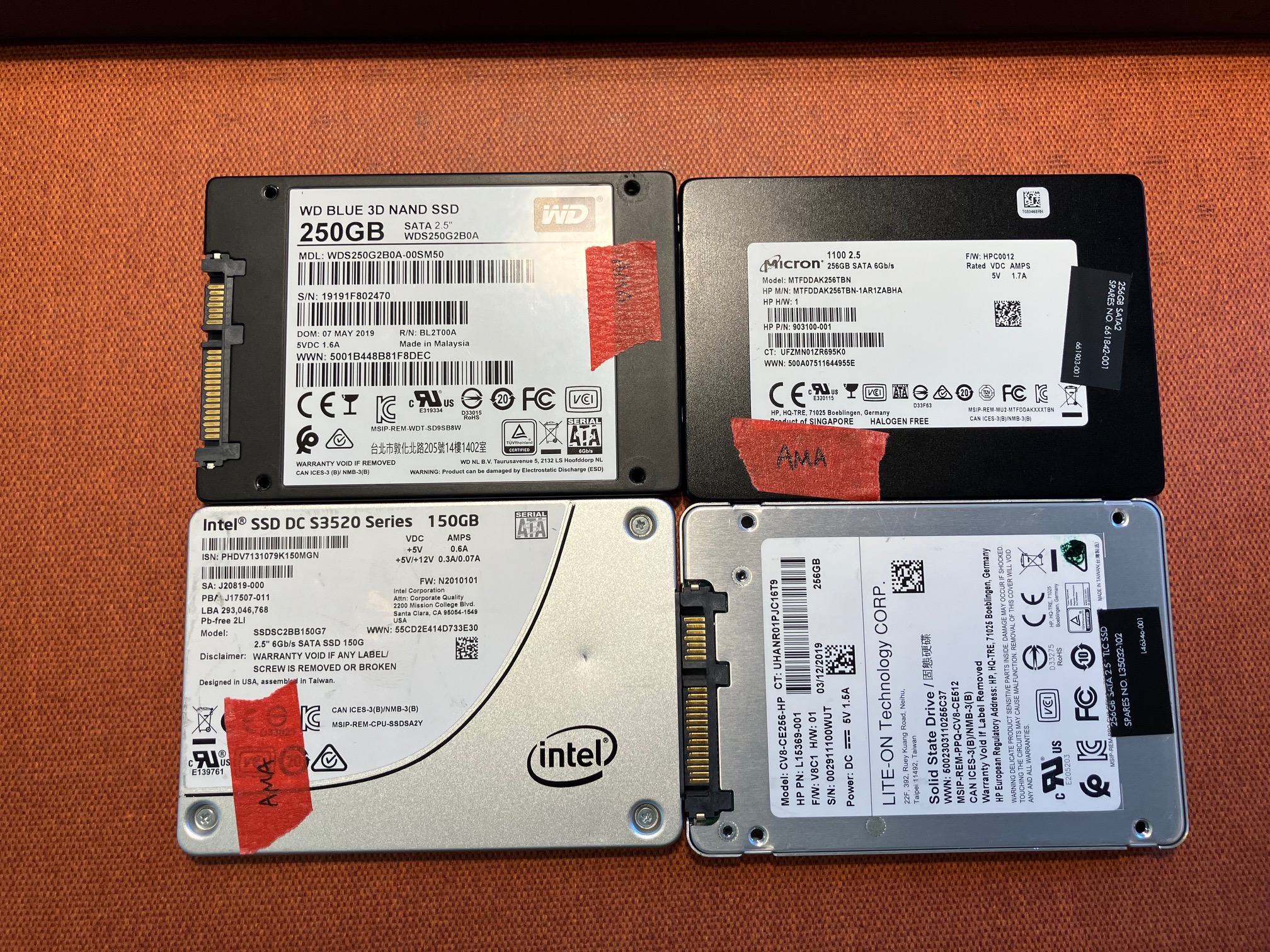
I sought drive models with documented support of the ACS-3 standard or newer. I also looked for the drive I encountered an AMAC reset error with (CV8-CE256-HP) to replicate my observations on a non-corporate asset. Interestingly, the closest information I could find for the Lite-On drive is for a CV8-CE256-72. It documents that 500,118,192 sectors are user-accessible (several tools detect 500,118,193 sectors for the CV8-CE256-HP) and references the AT Attachment 8 – ATA/ATAPI Command Set (ATA8-ACS), which doesn’t support AMAC. Otherwise, I was able to identify a few of models that support the AMAC feature set and purchased all the drives from eBay.
| Make | Model | Capacity |
|---|---|---|
| Lite-On | CV8-CE256-HP | 256GB |
| Intel SSD DC S3520 Series | SSDSC2BB150G7 | 150GB |
| Western Digital Blue 3D NAND | WDS250G2B02-00SM50 | 250GB |
| Micron 1100 | MTFDDAK256TBN | 256GB |
Setting and Resetting AMAC
Testing Procedure
Primarily using the Micron 1100 SSD, I went through several iterations using different tools with the following steps to validate if it can detect and reset AMAC. This is to ensure all data is read and saved, and the size of the drive is correctly determined (SWGDE, 2018). In the sections after, I provide additional details about how I added data to the drive, set AMAC and reset AMAC.
- Add known data to the drive at the last 512-byte sector (Max LBA) with a hex editor.
- Use HDAT2 to set AMAC to hide Max LBA.
- Connect the drive to a write-blocker or similar tool to verify it detects AMAC.
- Attempt to view the data added at Max LBA to confirm it is hidden.
- Reset AMAC using a write-blocker or similar tool.
- Verify the data at Max LBA is now accessible.
Adding Data
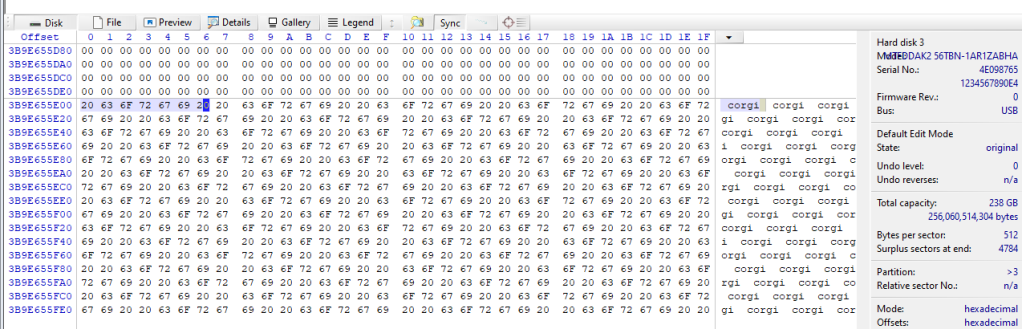
Using WinHex v21.1 SR-3, I opened the disk (Tools | Open Disk…). At Max LBA, I filled the block with hex values, “20636F72676920” (Edit | Fill Block…).
Setting AMAC
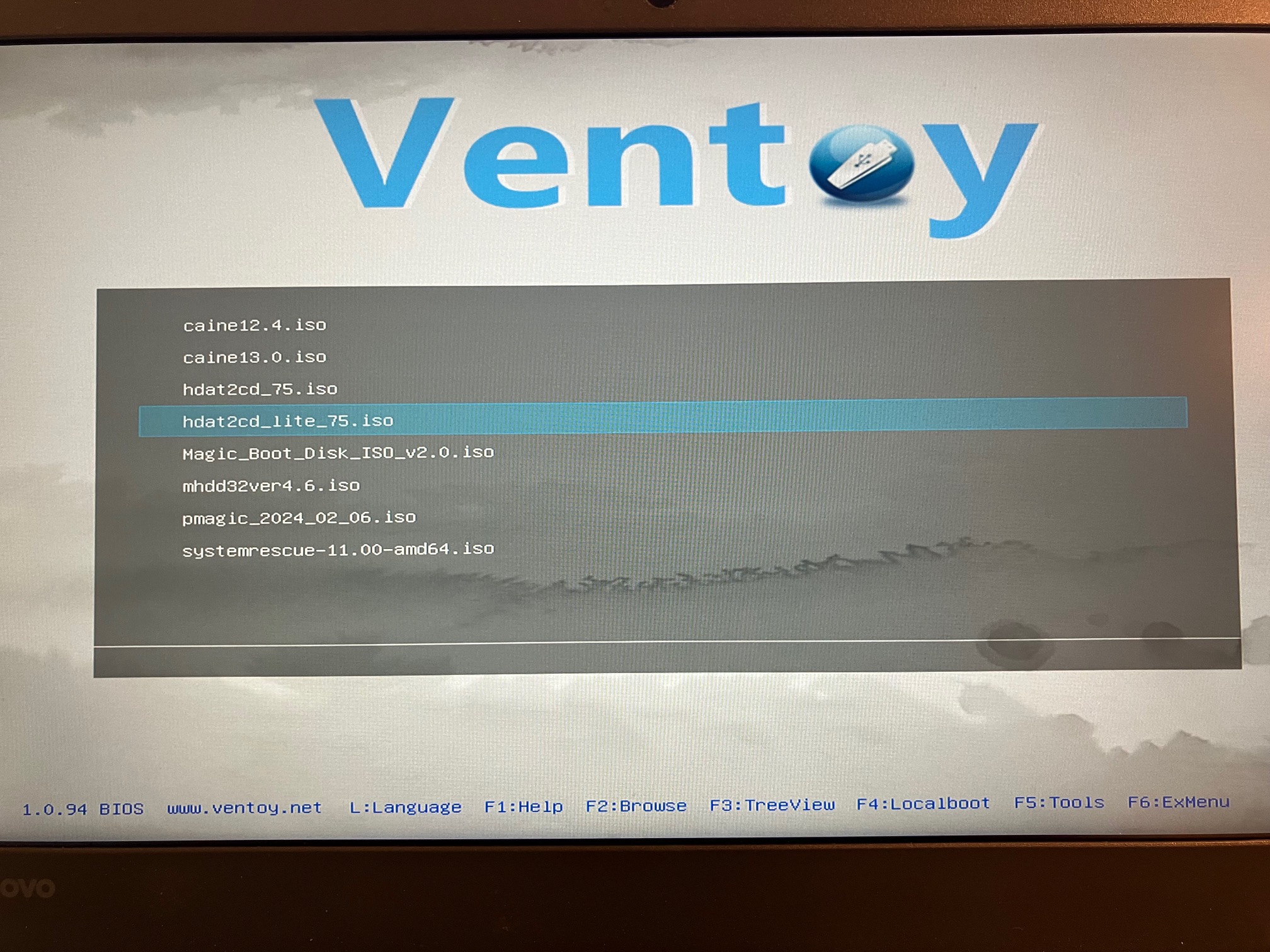
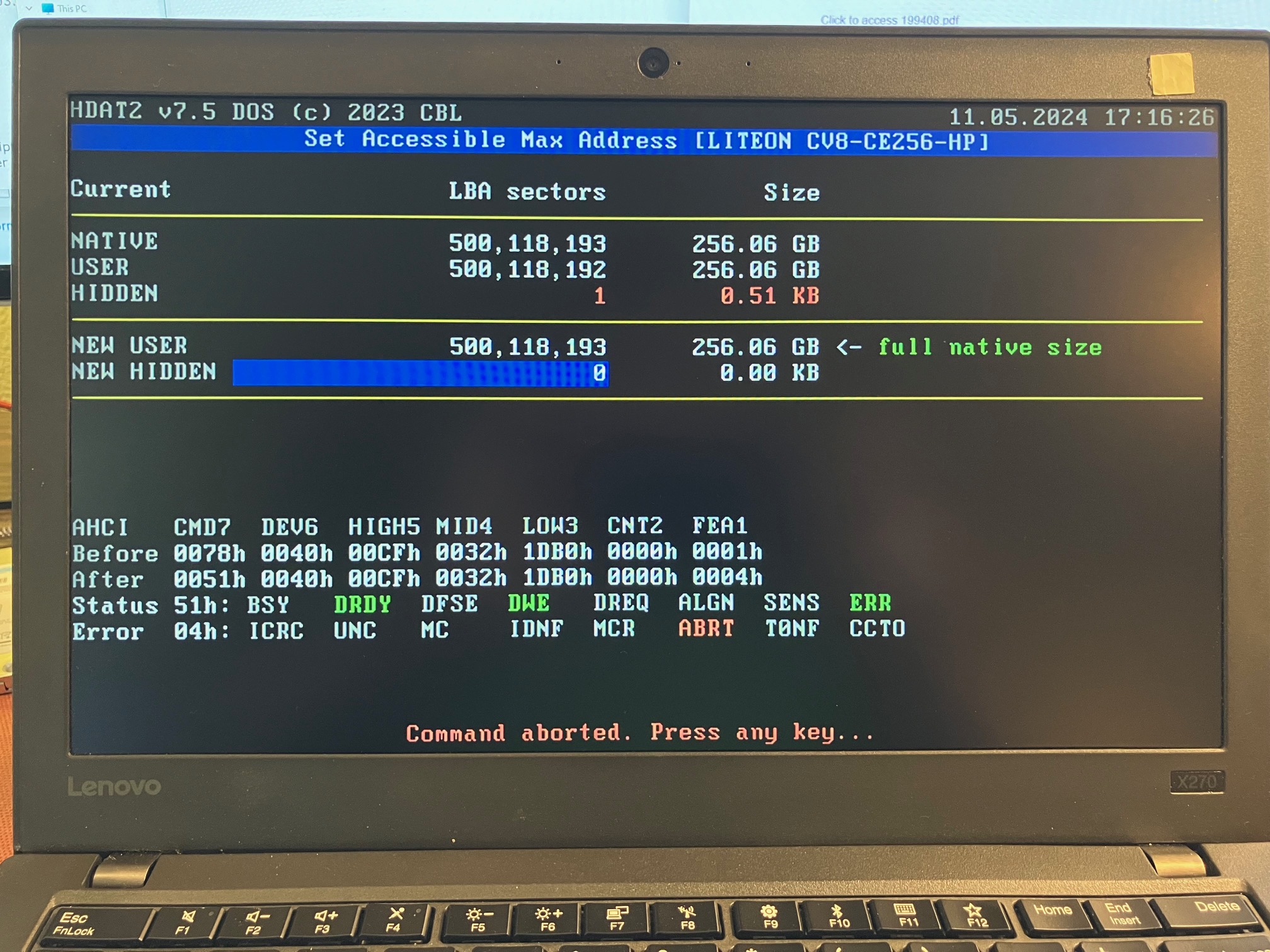
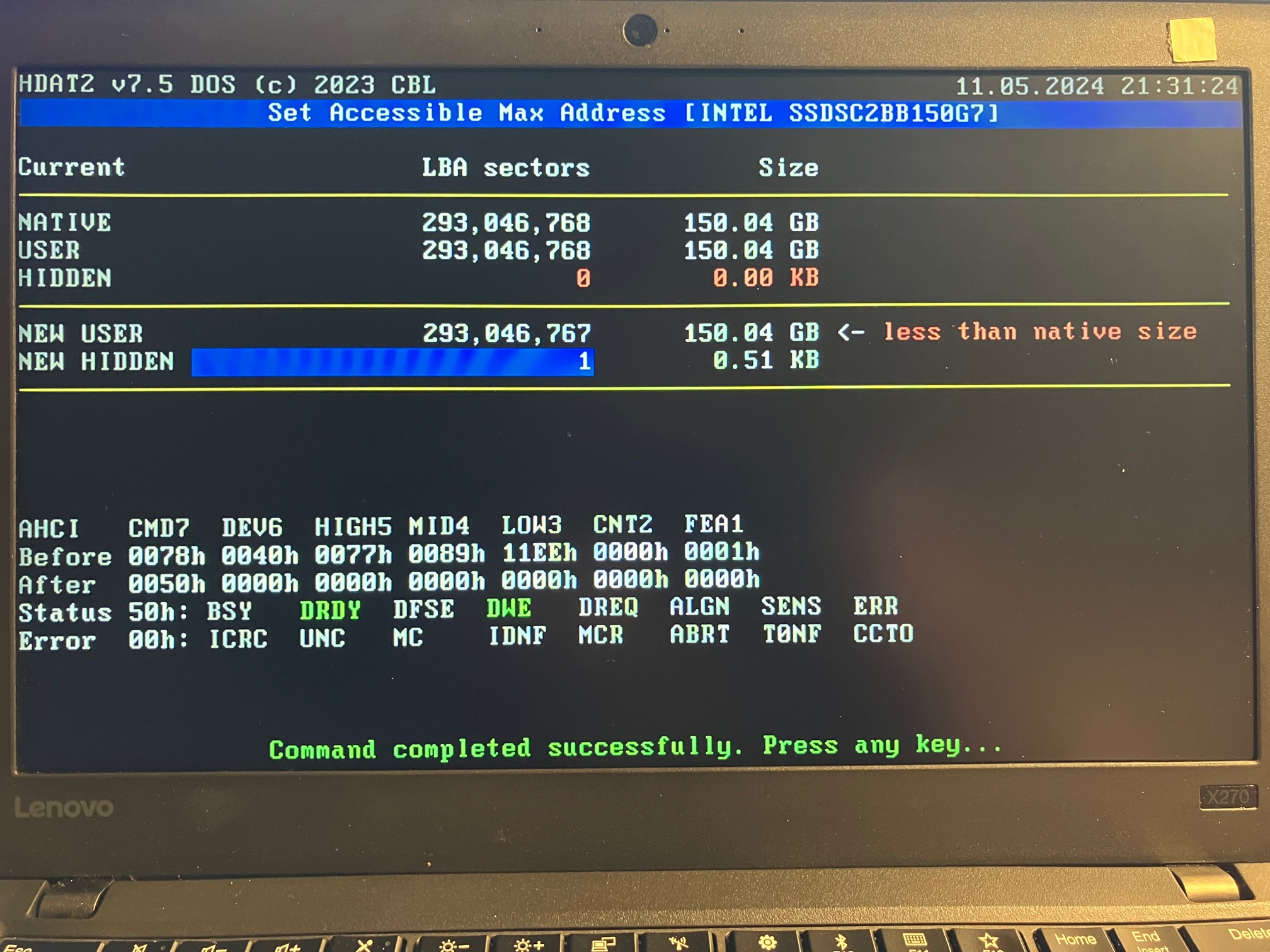
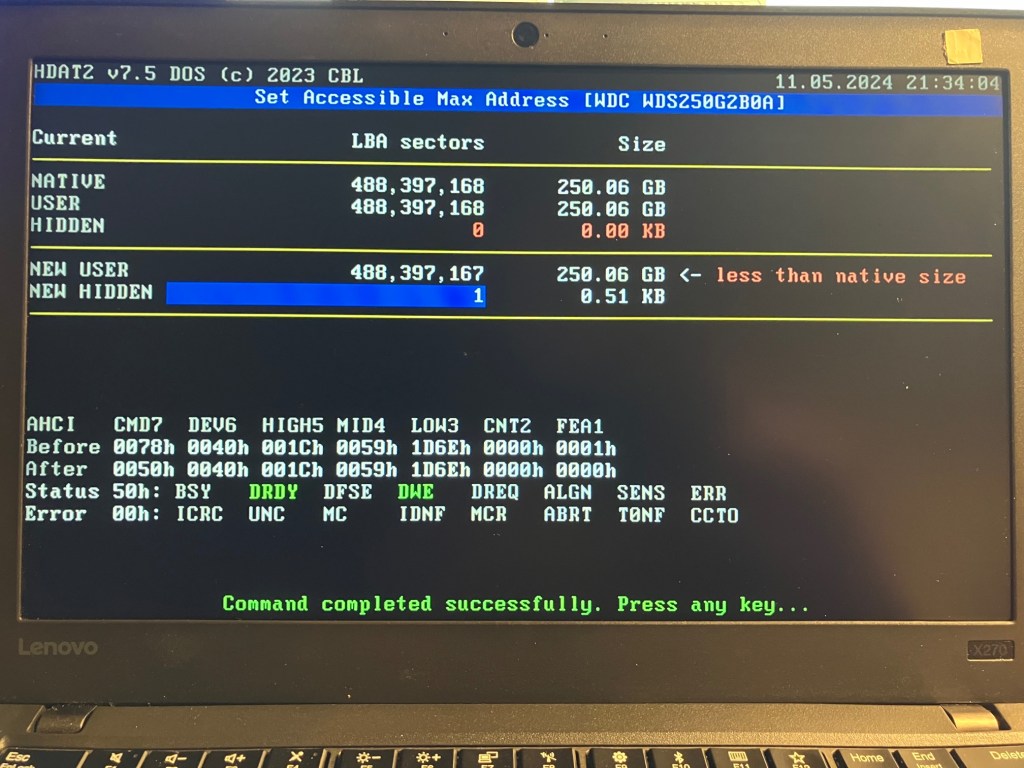
To interact with the drives, I booted to an HDAT2 Lite v7.5 .iso loaded on a USB thumb drive with Ventoy using a machine that supports legacy BIOS mode. HDAT2 is a program for testing and diagnostics of several storage devices. Ventoy is a tool to create a bootable USB drive with the option to boot to a selection of files of your choosing. While I was able to confirm AMAC support on the Intel, Western Digital and Micron drives, attempts to make any changes to AMAC on the Lite-On drive failed.

Resetting AMAC
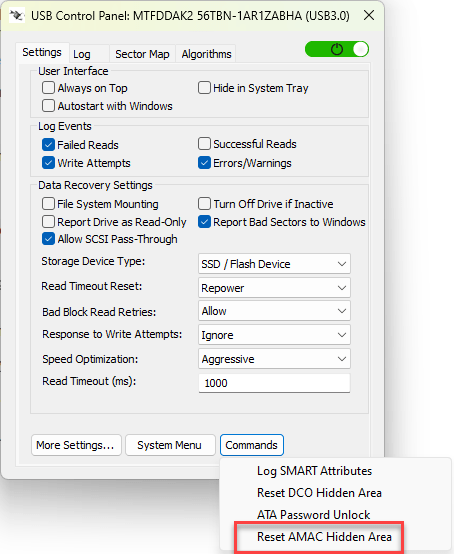
From tests with the Micron drive, I was able to detect and reset AMAC on a Tableau T356789iu (v22.3.0.3), Tableau TX1 (v23.4.0), WiebeTech UltraDock v6 (FW 80.66.0001), DeepSpar USB Stabilizer Pro (v3.17a), and DeepSpar Guardonix Pro (v3.17a).


The following images are from my tests using the DeepSpar USB Stabilizer Pro while ignoring write commands.



Carving with XWF from Revealed Hidden Areas
Using similar steps noted previously, I added a .jpeg file using WinHex at the end of the drive and set AMAC to hide sectors 500,117,344 through 500,118,192. After the reset, I used X-Ways Forensics (v21.1 SR-3) to perform a file header signature search within the sectors previously hidden by AMAC (Specialist | Refine Volume Snapshot, File header signature search | […] | Select ‘Pictures’ file type and “Search in block only”).
From my tests, detecting and resetting AMAC is an uncomplicated task on drives that support the ACS-3 standard using the Tableau T356789iu, Tableau TX1, WiebeTech UltraDock v6, DeepSpar USB Stabilizer Pro (v3.17a), and DeepSpar Guardonix Pro (v3.17a).
Comparing Drives, Before and After AMAC Reset
It’s expected the acquisition of the drive after an AMAC reset will acquire more bytes than the acquisition before an AMAC reset; therefore, comparing the hashes of the acquired data would not be an appropriate method to assess if any unintended changes occurred because of the AMAC reset. Instead, the data acquired before and after an AMAC reset may be compared using the Compare File/Disk Data command (Tools | Compare Data…) in XWF.


If you really wanted to, you could hash the data on the acquisition after the AMAC reset between 0 and 256060080128.


Yo CV8-CE256-HP, AMA(C) let you finish…
… but you’re the weirdest drive I have encountered of all time! The CV8-CE256-HP has an apparent firmware bug.
This issue has been identified as a bug in the SSD drive firmware. The drive has its firmware designed to have the 1st sector AMA set as 1 and that sector is inaccessible by the drive itself. When users image these drives they will get all of the data on the drive as the sector that is inaccessible by the drive due to the way the sector count started on the drive (1 instead of 0) which is a known “off by one” error.
OpenText KB0810871

Moreover, the Lite-On CV8-CE256-HP accepts a DEVICE CONFIGURATION SET command which indicates this drive likely uses the ATA8-ACS specification. This is consistent with the product information found for CV8-CE256-72.
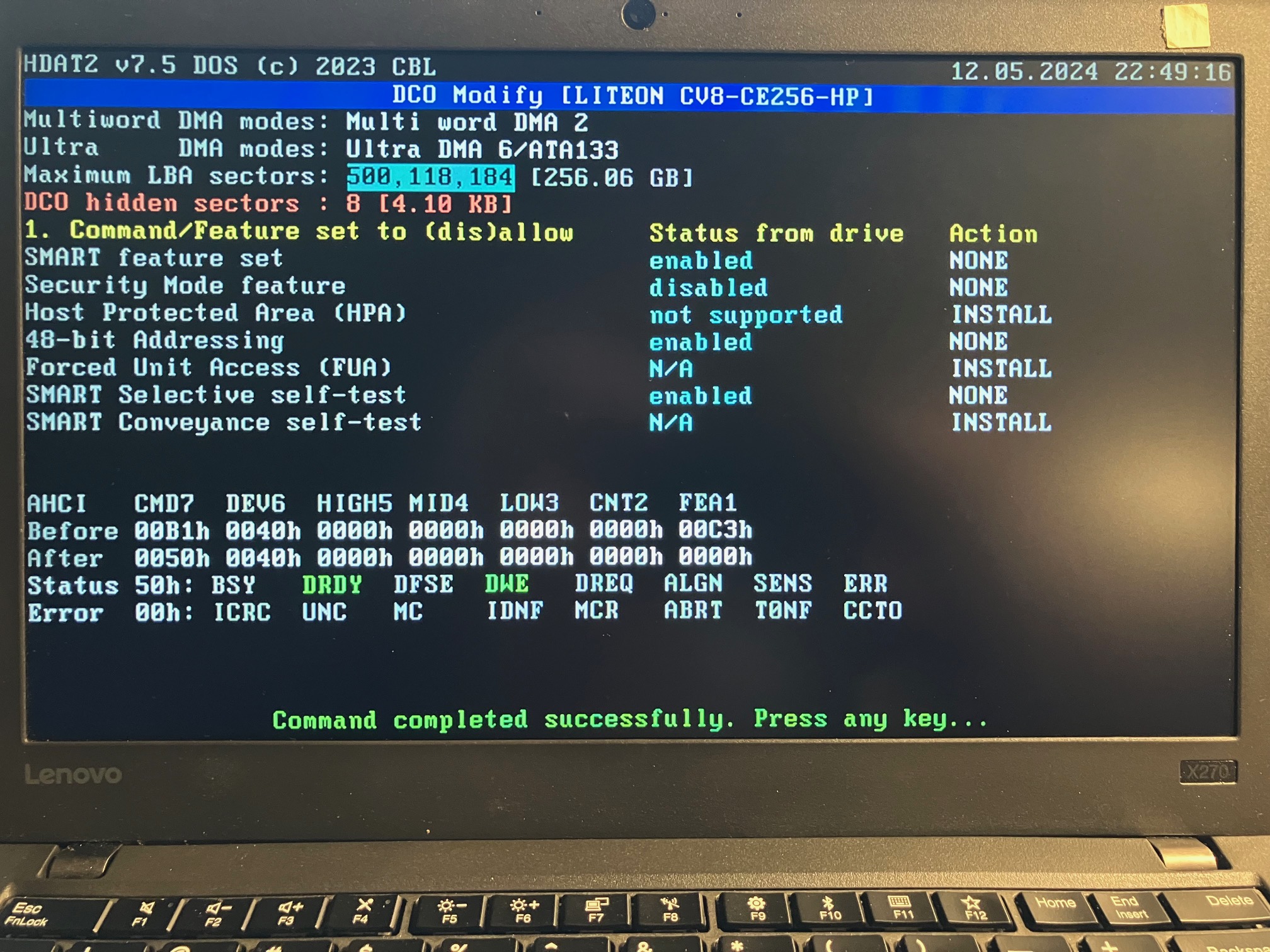
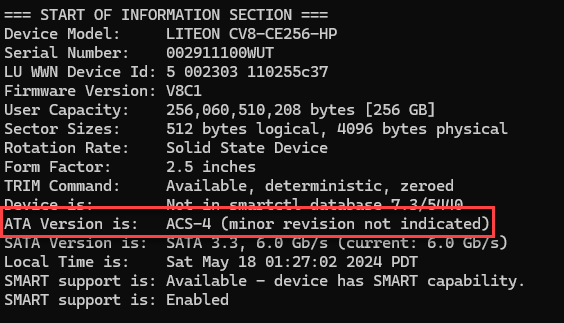
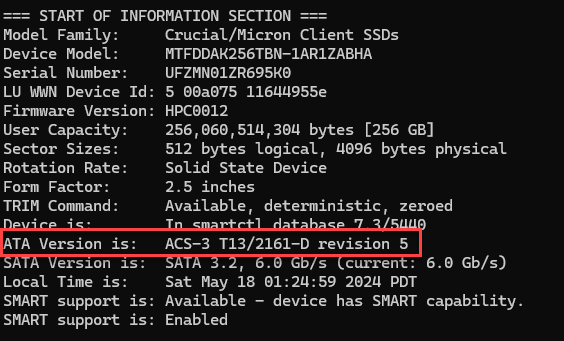
From this once in a lifetime scenario from a firmware bug, a matter reinforced in me is that a tool’s output may not accurately report a drive’s condition; the Tableau T356789iu, Tableau TX1, WiebeTech UltraDock v6, HDAT2, USB Stabilizer 3.17a and Guardonix 3.17a all “detect” drive space hidden by AMAC (an ACS-3 command set) on the CV8-CE256-HP. The existence of AMAC reported by the tools conflicts with a successful command (DEVICE CONFIGURATION SET) that precede ACS-3. The drive in this scenario appears it is reporting information incorrectly as a result of the firmware bug.
Summary
After encountering a drive that reportedly has areas hidden by AMAC, I refreshed my knowledge on HPA and DCO, and gained new awareness how AMAC may be used to hide data in drives using the ACS-3 specification or newer. I performed hands-on testing to reinforce my understanding of AMAC, and validated tools that can detect and reset AMAC. With help from the DeepSpar team, I was also able to use Guardonix Pro 3.17a and USB Stabilizer Pro 3.17a to detect and reset AMAC.
While it appears uncommon that hidden areas on drives are encountered in investigative work; having the awareness and tools to detect, and remediate that scenario may be helpful. For newer drives, understanding and identifying hidden areas, as a result of drive features like AMAC, can be crucial for digital forensic investigators to ensure no data is missed during an investigation.
OpenText technical support also revealed the issue of the drive that failed to reset AMAC is the result of a firmware bug, which is a known “off by one” error. Further testing on the drive indicates that it likely uses the ATA8-ACS specification and the erroneous reporting of an AMAC by the tools is attributable to the bug.
Have you encountered hidden areas on drives in your digital forensic investigations? Please consider sharing your experiences or questions in the comments below.
Special Thanks
In my attempt to understand why an AMAC reset was failing on a CV8-CE256-HP, the OpenText technical support team researched the issue and promptly provided feedback. Thank you, OpenText!
In the early stages of my testing, detecting and resetting AMAC was not supported by DeepSpar’s USB Stabilizer Pro. After reaching out to Serge Shirobokov with DeepSpar, the team successfully worked in a solution to detect and reset AMAC. That is available in the 3.17a release for both the USB Stabilizer and Guardonix. I’m always appreciative of Serge’s experience and expertise. Thank you, DeepSpar!
Cynthia Tuck allowed me to borrow her WiebeTech UltraDock v6. Thank you, Cynthia!
Useful Links
In an openSeaChest GitHub Issue, vonericsen shares helpful information related to the Secure Erase command to clear hidden areas. John (Micron) also shares some insight here when using PartedMagic.
In Computer Forensics and the ATA Interface, Arne Vidström shares advice to investigators regarding hidden areas, SMART and other ATA topics.
If you thought this topic was interesting, please consider experimenting with HDAT2. If you want to learn more about Ventoy, BlueMonkey4n6‘s video is a great watch.
References
Carrier, B., (2005). File System Forensic Analysis. Addison-Wesely. 37, 38 & 52.
Gupta M.R., Hoeschele, M.D., Marcus K. Rogers M.K., (2006) Hidden Disk Areas: HPA and DCO. International Journal of Digital Evidence, Fall 2006, Volume 5, Issue 1. https://www.utica.edu/academic/institutes/ecii/publications/articles/EFE36584-D13F-2962-67BEB146864A2671.pdf
Hatfield, J., Hubbard, D., (2012). Synch with ACS-3: Proposed changes to Serial ATA Revision 3.1. https://sata-io.org/sites/default/files/TP_044v7_SATA31_TPR_D156_synch_with_acs-3.pdf
Nikkel, B., (2016). Practical Forensic Imaging: Securing Digital Evidence with Linux Tools. No Starch Press. 39,118.
NIST, (2006). Guide to Integrating Forensic Techniques into Incident Response. https://nvlpubs.nist.gov/nistpubs/legacy/sp/nistspecialpublication800-86.pdf
Page, A., Gregory, S., (2020). EnCase Forensic & Tableau v20.2 Release. DataExpert. https://www.dataexpert.nl/media/rczo0203/opentext-forensics_dataexpert_webinar.pdf
SWDGE, (2018). SWGDE Establishing Confidence in Digital and Multimedia Evidence Forensic by Error Mitigation Analysis, v. 2.0. https://www.swgde.org/12-q-001/
T13, (2013). Information technology – ATA/ATAPI Command Set – 3 (ACS-3) Draft. https://people.freebsd.org/~imp/asiabsdcon2015/works/d2161r5-ATAATAPI_Command_Set_-_3.pdf
U.S. Dept. of Justice, Office of Justice Programs, National Institute of Justice, (2004). Forensic Examination of Digital Evidence: A Guide for Law Enforcement. https://www.ojp.gov/pdffiles1/nij/199408.pdf
Feature image generated with WordPress’ Jetpack AI Assistant. Prompt: “Show a disk drive with accurate anatomy that was found inside a dusty warehouse containing archived files after missing for hundreds of years. Lots of papers and files on the ground. Foggy. night time.”
Edit 2024-05-20: Clarified a statement. In this case, the tools may accurately report on a drive based on the information on the drive; however, the information on the drive may conflict with known standards.

 mr. eerie
Leave a comment